
SWOT analysis is an essential tool for any organization to evaluate its position in the market based on four factors; Strength, Weakness, Opportunity, and Threat. While the strengths and weaknesses are considered internal factors, both opportunities and threats are considered external factors.
In a previous article, we covered SWOT analysis as a tool to explore innovation and creativity within companies. We explored how to use SWOT analysis to evaluate both positive and negative impact of the four factors in the success of new innovative ideas in the early stage of production. SWOT analysis can be used by both marketing and innovation teams to draw a clear understanding about the potential success or failure of new ideas.
The nature of this analytical process is a high priority and should be implemented at the early development stage, if not the resultant information can lead to potential risk if it isn’t clearly and completely understood by the stakeholders in both the innovation and production processes. During the SWOT analysis discussion, information should be provided by different teams to complete this understanding from the SWOT’s four perspective. The SWOT analysis is required for different scales and projects for virtually any company. While many companies consider the failure cost of a project as one of the innovation process’s hindrances, a thorough SWOT analysis can reduce this risk.
In order to evaluate the company’s strengths, weaknesses, opportunities, and threats, a table of four sections should be used to describe the characteristics of each factor and how the company stands based on each factor. Our SWOT analysis template can help you to evaluate new projects and ideas. However, many companies do not have the experience and knowledge to build a professional SWOT analysis report. The six SWOT analysis tools and applications below can be used to help companies to create this report using software assistance. Most of these applications can be used on desktop, some of applications can be used on mobile or table devices such as an iPhone and iPad.
1- SWOT Analysis Generator (cost: free)
The SWOT Analysis Generator is the easiest and most direct method to create a SWOT Analysis. The tool is released by Wiki Wealth. The web application includes four sections for each SWOT factor. Each factor is represented by a number of common characteristics. If custom characteristics are required, it can be added in a customer text field. Finally, the SWOT report can be exported as dynamic form.
2- Creately SWOT Diagrams (cost: free with upgrade versions)
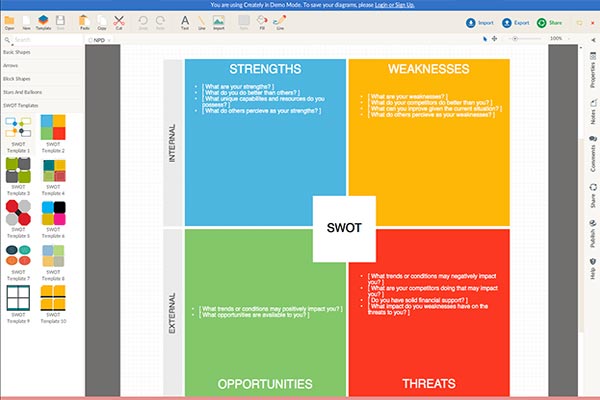
SWOT Diagrams software is a web tool that does not need installation. The web application includes SWOT Analysis templates and diagrams and can be used as a start to build a customized SWOT diagram. Unlike the SWOT Analysis Generator, SWOT Diagrams requires manual input for the characteristics of each factor which affects the company or the new project.
3- Smartdraw (starts from $197)
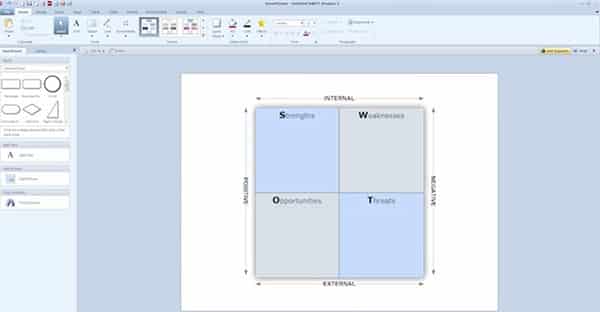
Smartdraw is a Windows-based application that is used to build SWOT Analysis diagrams based on existing templates. Each of these templates include a number of common questions that need to be asked to identify the strengths, weaknesses, opportunities, and threats associated with new product development (NPD). Smartdraw can be used to create other diagrams such as strategy maps, timelines, website wireframes…etc.
4- Gliffy (cost: free)
Gliffy is another web based tool to create charts including SWOT Analysis. It has a similar interface such as the Creately SWOT Diagrams. While Gliffy allows high customization through the drawing tools and shapes; It does not provide template examples to questions which are needed to be asked while evaluating each of the SWOT factors.
5- Grapholite (cost: Desktop $69.99, iOS and Android $14.99 and Windows mobile $9.99)
Grapholite is a downloadable application that can run on desktop, tablets, and mobile devices. Grapholite is a diagram drawing application that can be used to create different diagrams such as SWOT analysis diagrams, mind mapping charts and more.
6- SWOT Map (cost: $0.99)
SWOT Map is an iPad application that can be used to create a SWOT analysis based on more than 100 SWOT templates in addition to the having the ability to create customized maps. SWOT Map advanced over the other applications with its compatibility with iPad tablets that is used in business worldwide during meetings and evaluation sessions. In addition it can be used as a tablet camera to capture notes.
The above applications provide tools to create SWOT analysis reports based on existing templates or customization tools. In early project stages, quick and clear discussion should be conducted to identify the potential market success behind new ideas. Therefore, the SWOT analysis can analyze the project from different perspectives in order to build an understanding about the strengths, weaknesses, opportunities and threats of a corporation.





Leave a Reply