
As interactive and user experience designers, there was always the question: Why is there not a prototyping tool included in the Adobe Creative Cloud? Since the release of Adobe Creative Cloud, it has been known as an integrated platform for designers, developers, photographers, and media experts to build their projects through a bundle of applications and services available for subscribers of the Creative Cloud. However, one piece was missing, which is a quick tool for prototyping applications and user interfaces (UI). With the release of Adobe Experience Design CC (Adobe XD), this part of the design process is fulfilled, and now designers and user experience experts can prototype interfaces and build interactive previews using a real user-friendly tool.
When I was invited to the Adobe Experience Design CC prerelease program, I found out that the XD team behind this new application has a clear target, which can be easily noticed once you install the application to your computer (currently, Adobe XD beta is available for Mac users with the promise to be available for Windows users by late 2016). At first glance, what I really liked about the application is its clear view, simple interface, and quick load time. The application was introduced to the pubic last year during Adobe MAX 2015 with the beta name Adobe Comet. Adobe Experience Design CC is now available as a public beta that can be downloaded for free using Adobe ID from the Adobe XD page.
What’s in Adobe Experience Design CC
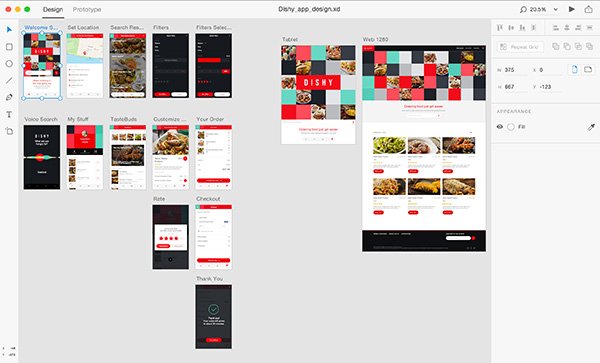
Prototyping is an essential phase in both user experience design and design thinking process. Therefore all the features in the Adobe XD are geared toward prototyping applications and UIs for web, mobile, and tablet devices with the ability to build interactive linkage between interfaces, preview, and share prototype presentations with teams and clients. The welcome screen provides numerous options to create an interface with different sizes with the option to modify these sizes or create new pages (Artboard) during the project’s development. The main screen consists of two sections: Design and Prototype. The Design section includes a number of tools and features to create elements, shapes, and fonts for the interface. Also, it includes tools to modify the artboard, create artboards based on existing web, mobile, or tablet standard sizes, or create custom dimensions.
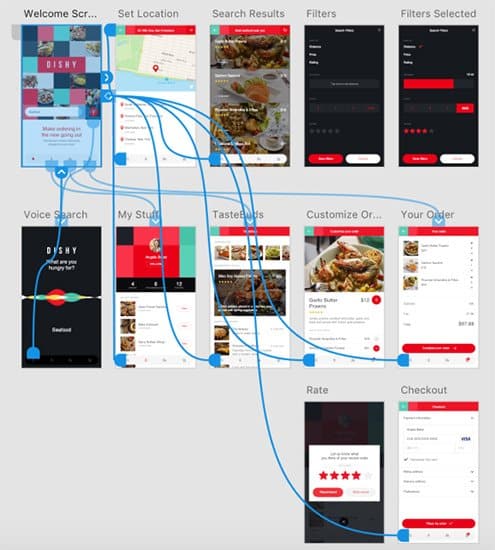
The second section of the Prototype includes methods to build a linkage between pages and organize the workflow of the application or website design. Clicking any part of the application provides options that allow the user to click this element to go to a specific screen and build a transition animation for the selected element in the UI design. The Prototype section provides an overview of the project, the relation between pages and subpages, and how user experience flows from one interface to another through displaying a visual of blue lines that highlight linked screens.
At the top-right side of the application interface, the preview icon allows designers to directly preview the prototype, record comments, and save as QuickTime movie. A second icon will generate a web link that can be shared with the team. The Adobe Experience Design help documentations provides a complete guide to use the application and explore.
Integration with Adobe Creative Cloud
Adobe Design Experience allows users to import resources in different formats such as JPG, PNG, and SVG. Also, users can directly drag assets from their computer to the application to insert into the UI design. Adobe Creative Cloud users can easily copy assets from different applications such as Adobe Photoshop and Illustrator and paste to Adobe XD project either using the selection tool in Photoshop or through selecting vector elements in Illustrator.
What’s Next?
In Adobe Blog, Andrew Shorten indicated that the current version is still in progress and more tools and features are expected to be added to the next version, including the following:
- Improving the work with colors
- Adding layers and support while working with them
- Improving the prototype sharing feature
- Adding a scrolling feature and supporting scrolling content
- Adding more interactions for prototypes
- Availability for Microsoft Windows 10
In addition to the above features, I believe more features should be added to improve interaction by adding elements such as checkboxes, radio buttons, form elements, and similar presets that designers can deploy directly in the layout without the need to create them from scratch. Also, I would like to see improvement in the export feature to include more formats such as PDF, which is commonly used to share prototypes to export artboards.
Adobe Experience Design adds a missing stone to the Adobe Creative Cloud family, especially for interactive and user experience designers. While the tool provides a promising solution for designers, it is still in the beta stage, and we hope to see more improvement in the next version that can provide a complete prototyping solution and seamlessly integrate with other Adobe Applications.





Leave a Reply