
When it comes to building a user-centered design, the core target is to have a solid understanding of the user experience and how users navigate through different design layout elements. Achieving this target requires clearly defined goals, which are supported with deep understanding of the end user through building a persona empathy maps and scenarios for user behavior. However, the involvement in many project details and process puts the main target on achieving human-centered design at risk, as the team focusing on smaller tasks isolates them from thinking in this target during the production process.
One of the commonly used tools to build a bird’s eye view about the user experience through the function streamline is by using mind maps. While mind maps are originally used for brainstorming, visual presentation, and solving problems, they can also be used to visually demonstrate how users interact with the design and navigate through different functions. Mind maps have been used for decades to visualize ideas, either using simple traditional tools such as white boards and markets, or digital and online mind mapping tools and applications.
Why Use Mind Maps?
Tracing the user experience behavior involves exploring how users navigate applications and what streamline users follow to move from one feature to another. Writing notes or instruction doesn’t help building a holistic view to linkage between different functions. Drawing these connections on a white board altogether can efficiently build an overview to relation between features and how users move from one to another. Additionally, mind maps can help the team to achieve the following:
- Ensure that users are in the center of the development process as it draws pathways based on the user behavior
- Ensure the project target is highlighted and considered during the development process
- Prioritize functions as the team tends to develop functions and features based on its relativity
- Guide the usability testing process as testers follow the functions in a similar way of how users navigate between functions
- Highlight the completed sections in order to identify the status of the project
Building the User Experience Mind Map
Before starting to draw the user experience mind map, the team should be aware of the following project elements in order to ensure that the mind map is set to achieve the desired target. These elements include:
- Project. Before building the mind map, the team should have a clear vision about the project and its related details.
- Goal. The project targeted goal, which should be supported with a solid user experience research.
- Persona. Based on the user experience research, a persona should be determined to summarize all the aspects related to the end user. The persona could be supported with an empathic persona to determine the mental state of the users.
- Task model. Having a task model from previous projects helps to build in an already existing experience of different tasks.
- Scenarios. Different scenarios of the user experience should be investigated and highlighted in order to understand how users are going to use each feature.
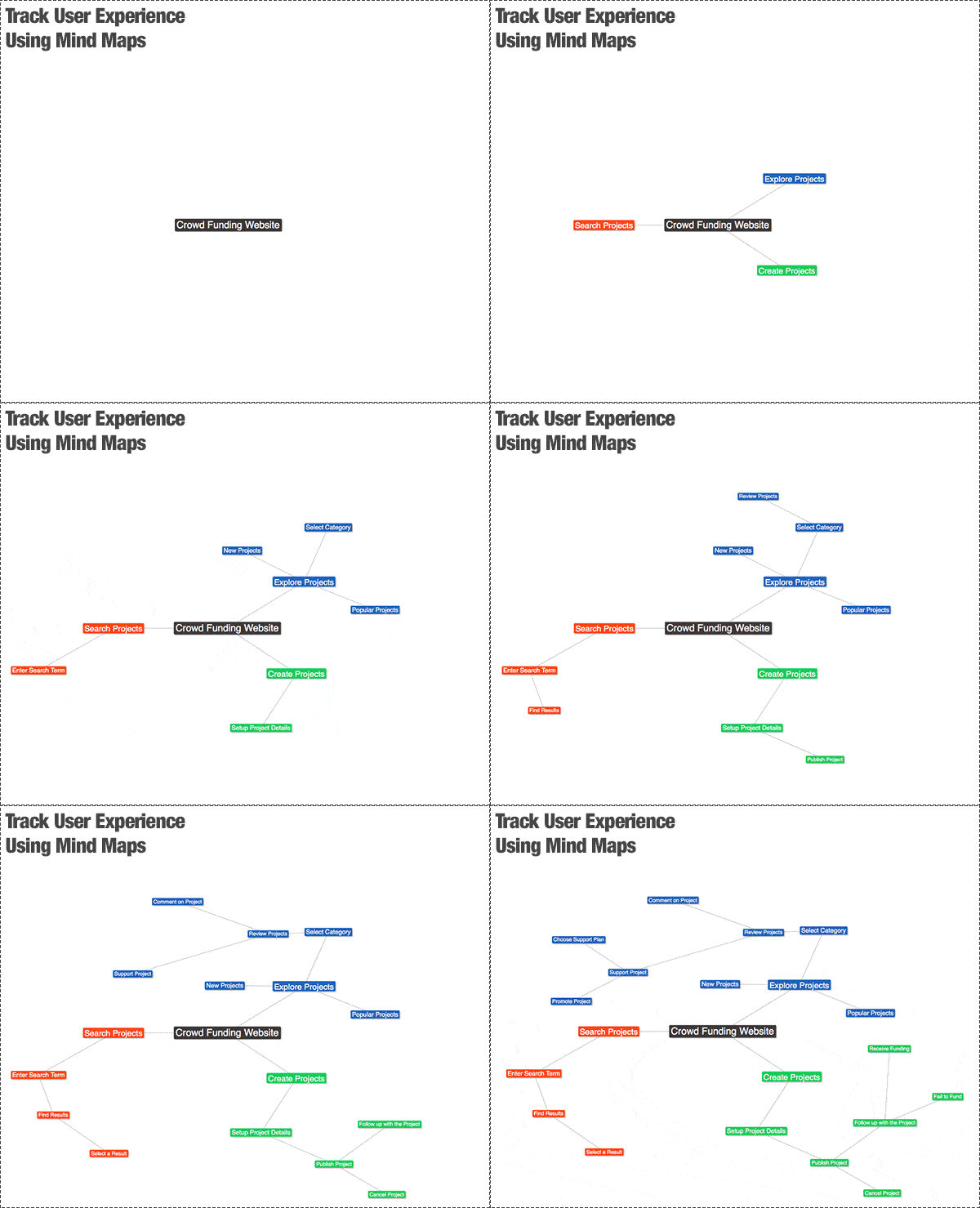
Once the above elements are clearly understood by the team, the team starts to build the mind map based on the user behavior rather than the actual features in the application as follows. The below GIF animation shows the steps of tracking user experience using mind maps.
Step 1: Core Idea
Start with the core application or product that needs to be investigated, for example, a crowdfunding website. Write the name of the project in the center of the white board or paper.
Step 2: First Navigation Branches
Create branches from the project name to represent where the user goes from the project homepage. In the example below, we’ll focus on the main streamlines for user experience, such as exploring projects or creating new crowd funding project.
Step 3: Second Navigation Branches
Create a second branch that maps the user behavior after deciding to use any of the first branch pathways.
Step 4: Build More Branches
Continue to build branches that visually present the user experience when using the mentioned application. The results will help the team to develop the project with the user behavior in mind.
As the above mind map reflects the user experience rather than the exact functions in the application, it helps the team to formulate a site map that reflects functions that serve the user behavior. A user experience mind map can provide a quick and easy tool for teams to link between the user experience research and the production stage, as it tends to present all the required data in a tree-like branches.





Leave a Reply