
The design process plays an essential role in achieving product success by ensuring that the user is at the heart of the development process and that the final product is innovative enough to compete in the market and achieve business needs. Google Design Sprint is one of the design process models developed to build user-centered products and services. Design sprints were developed by Google UX teams as a model that merges agile framework and design thinking in order to solve any design problems in a short time frame (typically 1-5 days). Google Design Sprints targets any size of teams from start-ups to large companies such as Google itself.
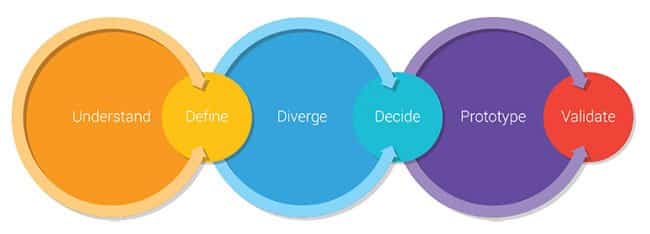
Google Design Sprint tends to directly address the design challenge and jumps to solutions through a constrained process of six stages: Understand, Define, Diverge, Decide, Prototype, Validate. Those stages run in the form of a limited time workshop period and involve representatives from the development process stakeholders, such as the marketing team, design team, development team and testing team. The workshop is run by a Sprint Master, who is usually a UX researcher, designer, or design leader with an awareness of the design challenges and the design process that will be used to address this challenge.
Design Sprint allows the team to evaluate the product at an early age of the development process by jumping directly to the prototyping and testing to ensure the final product meets with their consumers’ and business needs.
Advantages of Design Sprints
While there are many design process frameworks, such as the Stanford D.School design thinking, Double Diamond, and IBM Design Thinking process, the questions are: why do we need another design process; and what are the advantages of the Google Design Sprint over the other design processes? Below are a number of the advantages of the Design Sprint.
Results
Design process frameworks move through similar stages to the Google Design Sprints. However, it involves a lot of research and brainstorming that can end up with a tired team. With many people are sharing their ideas, the best solution to the address the problem may not be reached. This problem has been commonly noticed when applying the design thinking process. In the Google Design Sprint, each of the team thinks individually and the team vote for the best solution or prototype to adopt during the workshop time. Additionally, the prototype is tested by real users in order to ensure that the solution addresses their needs.
Team
In the other design process, there were no guidelines for the formation of the teams involved in the design process. Both the Google Design Sprint and IBM Design Thinking have introduced the agile framework as the team represents the different departments involved in the development process. This ensures the reliability of the solution and the team discuss its viability from all possible perspectives.
Time
Not all the design process models provide a timeframe for the team to work on; this is one of the disadvantages that have made many companies avoid the adoption of the design process, especially with tight project deadlines. Google Design Sprint reduces the time required to reach the prototype by adding constrains for each stage and gives a timeframe for the whole process (including the user testing for the prototype). This improves the efficiency of the design process and ensures the user’s needs can be properly addressed.
As noted, Google Design Sprint aims to address many of the issues in the other design process models. In order to achieve the above advantages, the Design Sprint consists of six stages, as highlighted below.
Google Design Sprints Stages
Design Sprint runs in a form of a workshop that can take from 1-5 days. During this workshop process, the six stages of the Sprint are applied: Understand, Define, Diverge, Decide, Prototype, Validate. Once the workshop is done the product can be taken to the production stage. In this practice part, we will explore how to run a successful Google Design Sprint with your team. However, it is important to understand the proper preparation for the Design Sprint is essential to reach a successful result.
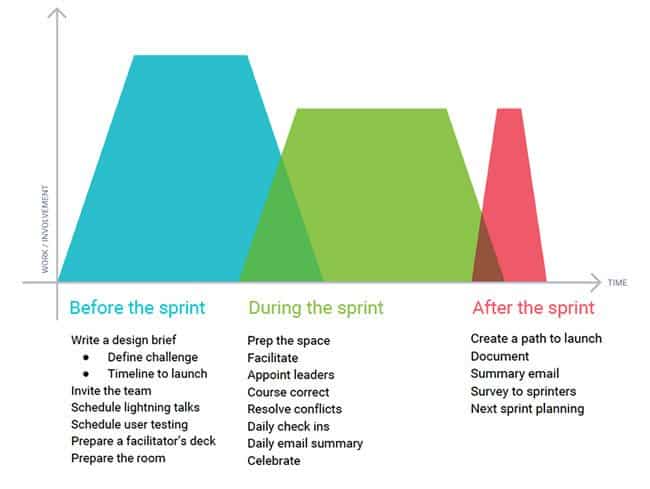
Before Google Design Sprint Workshop
Before starting the Design Sprint, three main preparation steps have to be completed: 1) recruit the team; 2) prepare the tools; and 3) find the place. The team is a representative of the company’s different departments involved in the project development. The group may consist of representatives from the design, marketing, development, and business developing departments. The team number may vary based on the size of the company and the departments involved in the project. Generally, the team is expected to include eight members.
The tools used in the Design Sprint workshop are very similar to those used in brainstorming sessions, such as; pencils, sharpies, sticky notes, voting dots stickers, colored papers, A4 papers, notebooks, whiteboard, erasable markets, a clock or stopwatch, and a prototyping tool such as Invision. Finally, the place should be quiet and away from other work distractions. Also, the room should be large enough and include tables and presenters to allow the team to sit comfortably and be able to draw their prototyping ideas.
It is important at this stage to define the timeline required to accomplish the workshop and get the prototype ready for the development process. Defining the timeline will help the team to stick with the required time and organize the different stage sin the Design Sprint workshop according to the overall timeframe.
Stage 1: Understand
This stage starts at the beginning of the day and it is important to define the challenges that need to be addressed during the workshop, for example: “Designing a physics application for young children”. At this stage, each of the stakeholders introduces the project from their own perspective in a short five-minute pitch. For instance, the developer representative might present the technology and coding side of the project and how the development team will address it. The methods that can be used at this stage include group discussions, user interviews, and field visits.
Stage 2: Define
The team starts to use different tools like the persona and journey map to define their users’ characteristics. If the product is multisegment, all the target segments should be defined at this stage. During this stage, the team can discuss the different motivations that can drive the consumer to use this product and the features that are expected to be included to meet the user needs. Both the first and second stage could be merged in the first day of the workshop as both are related to understanding the product and defining the target consumer characteristics.
One of the tools that are used to reach this definition is the “first tweet,” which let the members pretend that they are announcing the project through Twitter using its limited 160-characters message. This will help define the project target. For example: “Love cooking? Download MasterChef, a cooking app with over 1 million recipes!”.
Stage 3: Diverge
After understanding the required information regarding the project, each one of the team member should start to sketch eight different UI design ideas or product design ideas for the targeted product in five minutes. Then, the team should be asked to sketch one big idea in another five minutes. If the project is complex, the team may draw a storyboard to describe the user workflow and interaction.
The importance of this stage is that each member works individually based on their own perspective and image of how the final product looks.
Stage 4: Decide
After visualizing the members’ ideas of the product design, the Sprint Master should hang all the sketches on the board or a wall, before starting to gather votes for the different ideas. Before voting for the best idea, the team should take a take a time to silently vote for the ideas before getting affected by others’ opinions and votes.
Then, each one of the team member should use the voting dots stickies to vote for the top ideas based on the Priority Matrix. This method prioritizes the features based on the importance and ease of implementation: that is, easy and important, hard and important, less important and easy, and hard and not important. This can help the team to select the most agreed UI sketch from the different perspectives of all the stakeholders involved in the project.
In order to avoid a biased opinion, the group may be encouraged to use the six thinking hat tool to experience different aspects of the problems addressed in the UI design.
Stage 5: Prototype
Once the winning UI sketch is selected, the team should start to build a real prototype that represents the UI layout, interaction, and functions that will be presented in each UI screen. The reason for building the prototype is to create a realistic presentation for the product that can help gain user feedback without wasting money, time, and effort on unnecessary features.
This prototype should be representative of the final product as much as possible. The team may use tools such as Invision or Adobe Experience Design (Adobe XD) to build an interactive prototype where the users can add their comments and feedback. The prototype can be also a demo, video, and physical prototype.
Stage 6: Validate
Once the prototype is created, it should be tested in order to evaluate its viability. The testing should cover user testing, stakeholders’ feedback, and technical feasibility check. These three types of validation check help to understand the viability of the product design idea from users, stakeholders and technology perspectives.
This stage reveals the iterative nature of the Google Design Sprint as the team can return to any stage to fix problems that are highlighted in the validation stage.
Challenges of Applying Design Sprints
While Google Design Sprint works to overcome many of the drawbacks of the design thinking models, there are challenges when applying this method that needs to be taken into consideration. The first challenge that may be faced is the reach of a skillful Sprint Master. The Sprint Master is the facilitator of the workshop, and it is their duty to manage different stages, time constraints, and transitions between stages. If the Sprint Master lacks the skills to run the workshop properly, this will negatively affect the final results of the season.
Another challenge is the size of the company and the availability of the representative stakeholders. Google Design Sprint is designed for companies who can afford to assign representatives from different departments in the discussed project. This may not be affordable for small companies as they usually work with a small team who are involved in varied tasks. Running a Design Sprint may cause extra load on the team as they will need to work on the Sprint besides their initial tasks. Also, it may be hard to facilitate putting the different representatives together at the same time, which is the core idea behind the Sprint workshop.
Generally, the above challenges may face small companies as they have a more limited budget to facilitate a Sprint Master or put their small team together to conduct a Sprint workshop.
Resources
In addition to the above practice, Google has released the Design Sprint Methods, which provides further information about the process and how to apply it in different projects. Below are some resources that can be used to practice Design Sprint workshops:
Google Design Sprint is one of the successful design process models that aims to overcome the disadvantages of previous design process models as the Design Sprint planning include considering a dedicated timeline for each step, choosing the right stockholders involved in the process, and ensure that the final results are user-centric. Design Sprints merges the benefits of an agile framework and design thinking in order to maximize consumer satisfaction. The Design Sprint is flexible and can be applied to different company sizes.





I haven't tried a design sprint yet but I just love the idea. It has so many applications beyond digital.
What I liked the most in this tool it merges between agile framework and design thinking. This way it can merge the advantages of both. What I am thinking now is can we apply it in university course to change how the students think about application development.
Sprint week in action
https://www.behance.net/gallery/45330209/Design-Sprint-Week